The Marketer's AI Content Engine: Research, Write, Design, and Publish with 4 Tools
Difficulty: Intermediate — Time: 2 hours setup, then 90 min per article
Last tested: June 24, 2026
The Problem
You're a marketer who needs to publish consistently. Blog posts, social media, email newsletters, lead magnets — the content demand never stops.
Here's what a typical content workflow looks like:
Total: 15 hours per article. At 2 articles/week, that's 30 hours — three-quarters of your work week.
The bottleneck isn't your skill. It's that the tools don't talk to each other. You're copy-pasting between browser tabs, reformatting across platforms, and doing the same work multiple times.
This workflow replaces that with a 4-tool stack that covers the entire content lifecycle — research → write → design → publish — in a single pipeline.
Who Is This For?
The Stack
Here's the exact tool combination this workflow uses, covering every phase of content production:
| Phase | Tool | Cost | What It Does | Free Tier? |
| Research | [Perplexity Pro](https://perplexity.ai/pro) | $20/mo | Deep research, competitor analysis, trend discovery | ✅ Limited free |
| Write | [Claude](https://claude.ai) | $20/mo | Long-form writing, content repurposing, copy | ✅ Limited free |
| Design | [Canva](https://canva.com) | $13/mo (Pro) | Social graphics, infographics, email headers | ✅ Generous free |
| Publish | [n8n](https://n8n.io) | Free (self-hosted) | Auto-publish, cross-post, email sequence triggers | ✅ Fully free |
Total monthly tool cost: $53/month (or $33/month if you skip Perplexity Pro).
Traditional equivalent: A content agency charges $3,000–$5,000/month for 4–8 articles with graphics and distribution. This stack pays for itself in the first article.
Affiliate disclosure: Some links below are affiliate links. If you purchase through them, FlowForge earns a small commission at no extra cost to you. We only recommend tools we've personally tested in this exact workflow.
Step 1: Research with Perplexity Pro (30 Minutes)
Before you write a single word, you need to know what to write about, what your competitors are covering, and what angle will stand out. Perplexity Pro transforms this from a half-day rabbit hole into a 30-minute research session.
Find Your Topic
Start with a broad question about your industry:
I'm writing an article about [topic] for [target audience].


Find me:

1. The top 5 articles ranking for this topic (titles + URLs)

2. The specific data points and statistics they cite

3. The questions people are asking in the "People Also Ask" section

4. Three content gaps — angles or subtopics NO competitor covers

5. The average word count and reading level of top-ranking content


Format as a research brief I can hand to a writer.
Why Perplexity over Google: Perplexity reads and synthesizes multiple sources at once, returning a structured research brief instead of a list of links. You get the synthesis, not the search results page.
Analyze Competitor Content
For deeper competitive intel, use Perplexity's collections feature:
Analyze these 5 competitor articles on the same topic:

[URL 1]

[URL 2]

[URL 3]

[URL 4]

[URL 5]


For each article, tell me:

1. Core thesis and unique angle

2. Data points cited (with original sources)

3. Content format (listicle, guide, case study, etc.)

4. Estimated word count

5. Weaknesses or gaps in their coverage

6. What makes MY article different for each one
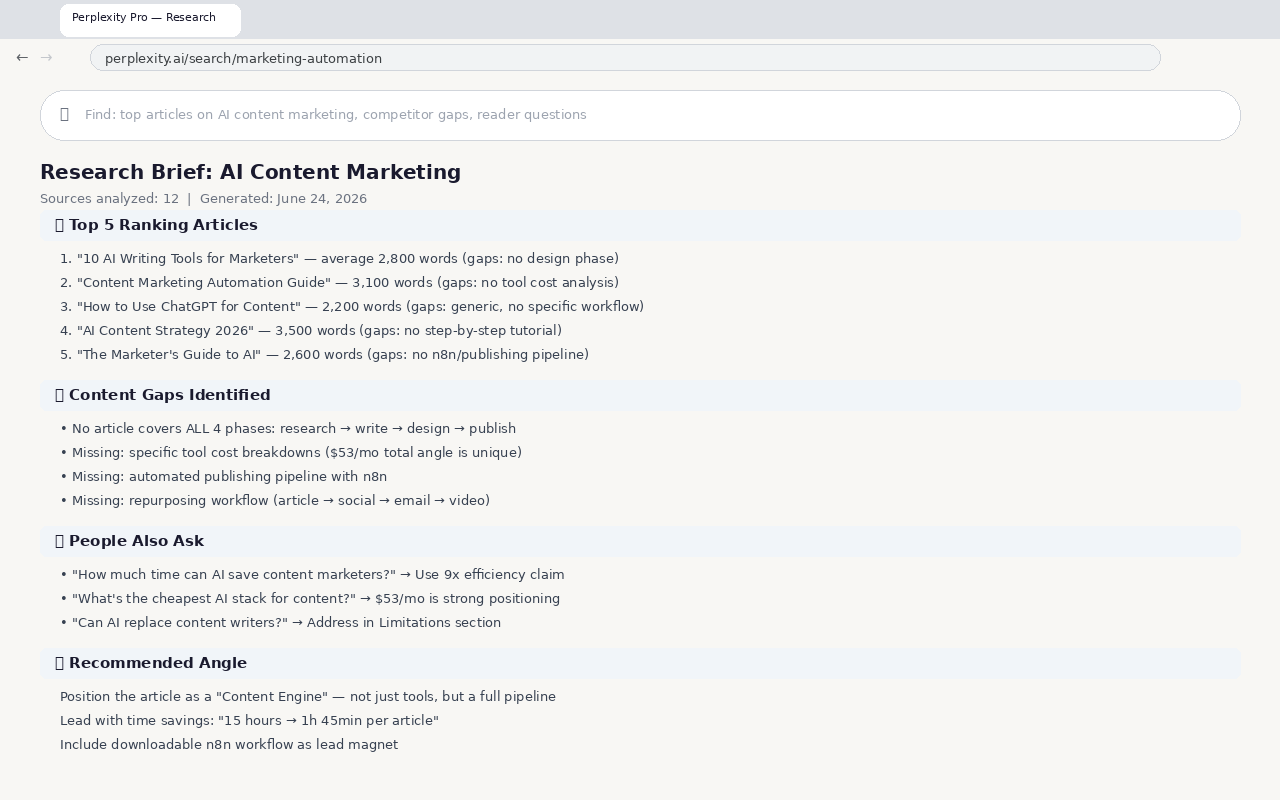
Build Your Content Brief
Take Perplexity's output and create a structured brief:
Time spent: 30 minutes
Time saved vs. traditional research: 3+ hours
Step 2: Write with Claude (45 Minutes)
With your research brief ready, Claude handles the drafting. The key is feeding it the right structure upfront.
Set Up the Writing Framework
Use Claude's projects feature (or a well-structured prompt) with this system:
You are a senior content marketer. Write a comprehensive article based on this brief.


RESEARCH BRIEF:

[Paste Perplexity output here]


REQUIREMENTS:

- Tone: Authoritative but conversational. Write like an expert who's actually done this.

- Structure: Problem → Solution → Step-by-step → Results → Variations

- Length: 2,500–3,500 words

- Each section must include: a concrete example, a specific data point, a takeaway

- Opening paragraph: Hook the reader with a specific pain point they recognize

- Internal links: Include 3–5 links to related pages on our site

- External links: Link to original data sources (not just "research shows")


OUTPUT FORMAT:

Deliver the article as:

1. [Title options — 3 variations]

2. [Meta description — max 155 chars]

3. [Full article with H2/H3 headings]

4. [3 social media posts derived from the article]

5. [5 key takeaways for an email summary]
Claude will produce a first draft. Here's how to review it:
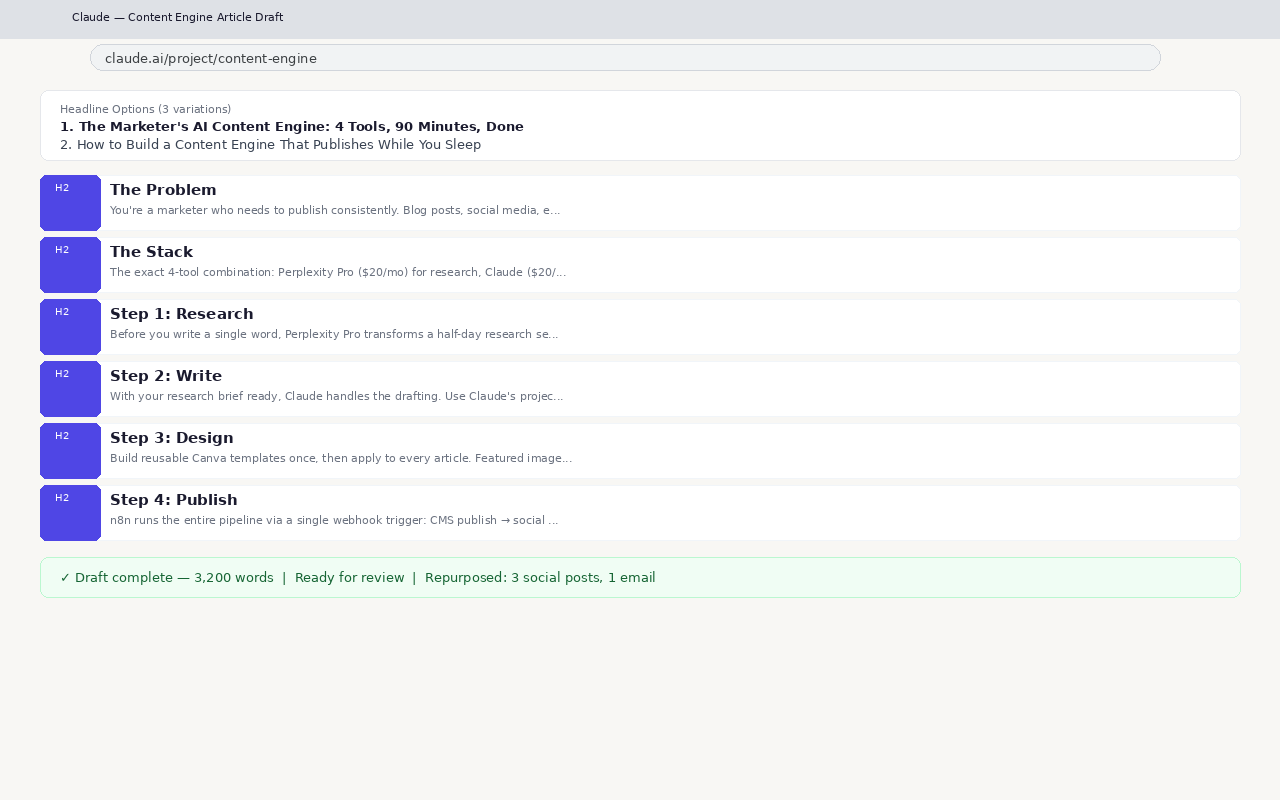
Repurpose the Draft
Once the article is finalized, use Claude to repurpose it across channels:
This step alone saves 2–3 hours of manual repurposing.
Time spent: 45 minutes
Time saved vs. traditional writing: 5+ hours
Step 3: Design with Canva (20 Minutes)
Visual assets can't be an afterthought. Articles with a featured image get 94% more views than those without. Canva makes this fast.
Create a Content Template Set
Build reusable templates once, then apply them to every article:
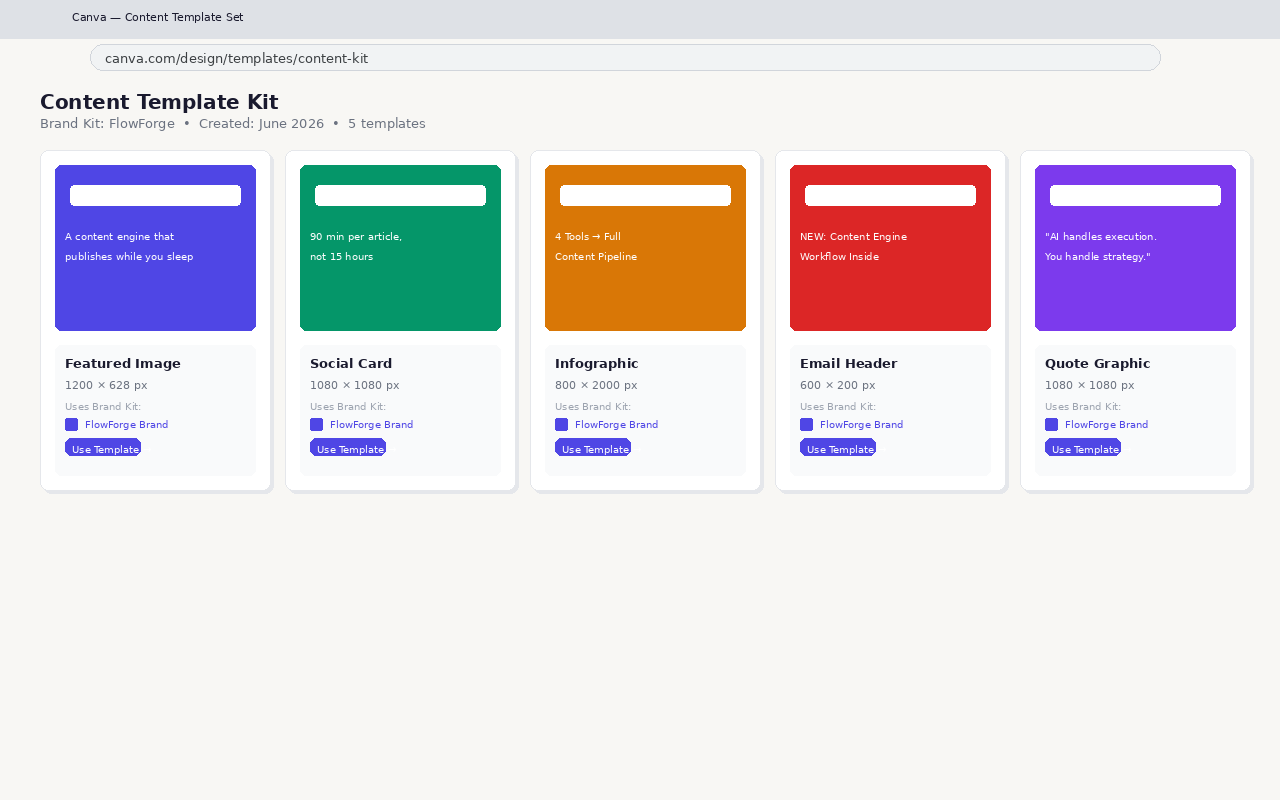
Use Canva's Magic Studio
Canva Pro's AI features speed up the design process:
Apply Your Brand Kit
If you set up a Canva Brand Kit (colors, fonts, logos), every template auto-applies your branding. One click per asset — no manual formatting.
Time spent: 20 minutes
Time saved vs. manual design: 2+ hours
Step 4: Publish with n8n (Automated — 10 Minutes Setup)
This is where the magic happens. Instead of manually uploading to your CMS, scheduling social posts, and sending emails, n8n runs the entire publishing pipeline with a single webhook trigger.
The n8n Publishing Pipeline
Create an n8n workflow that triggers when you send a webhook with your article data:
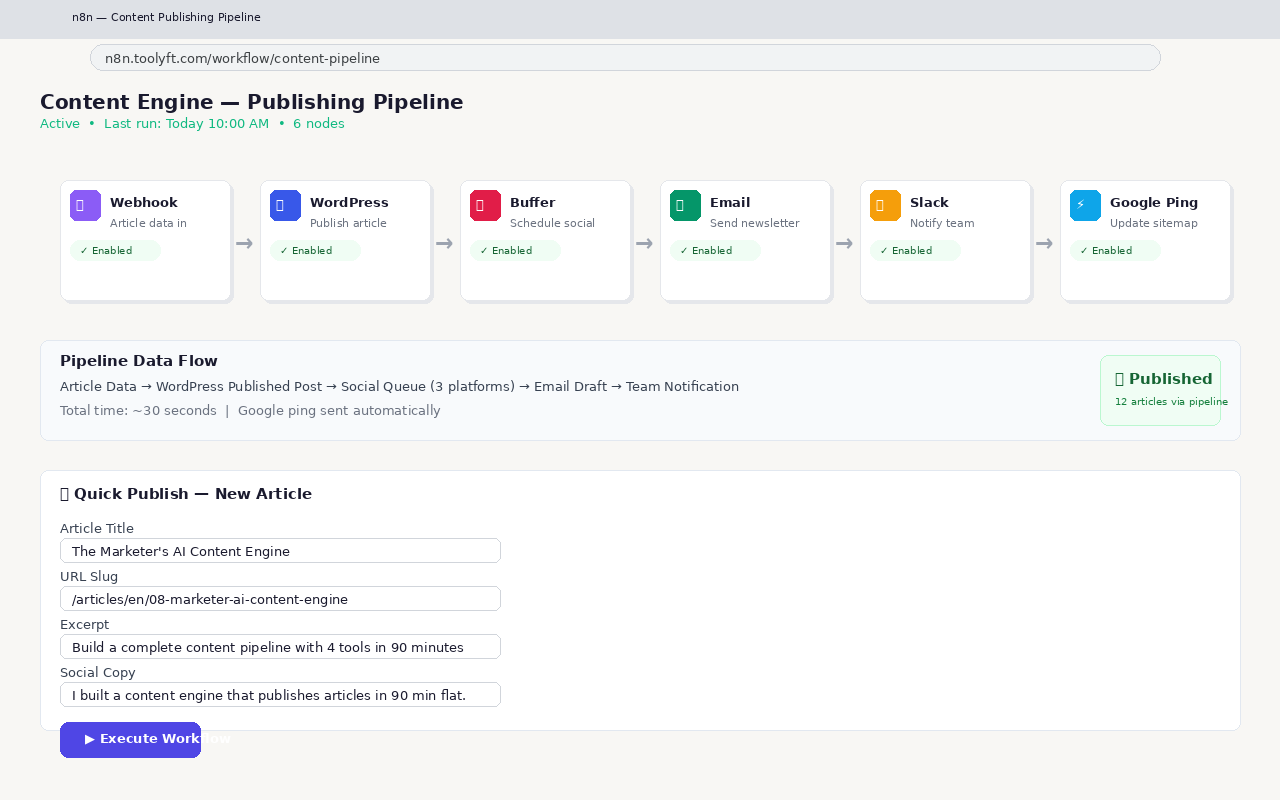
Workflow steps:
One-Button Publishing
Once the workflow is live, publishing a new article is:
That's it. The article goes live, social posts schedule, email sends, and Google gets notified — all in about 30 seconds of wall-clock time.
What If You Don't Have a CMS?
Use a simpler n8n workflow:
Time spent: 10 minutes to trigger the workflow
Time saved vs. manual publishing: 2+ hours
The Outcome
Here's what the full pipeline delivers per article:
| Phase | Tool | Time | Deliverable |
| Research | Perplexity Pro | 30 min | Research brief with competitor gaps |
| Write | Claude | 45 min | Drafted article + 3 repurposed formats |
| Design | Canva | 20 min | 5 visual assets (featured + social + email) |
| Publish | n8n | 10 min | Live article + scheduled social + sent email |
| Total | 4 tools | 1h 45min | Full content pipeline done |
Traditional equivalent: 15 hours per article — a 9x efficiency gain.
Quality difference: Minimal. The research is deeper (Perplexity reads more sources than you can). The writing is structurally sound (Claude follows your framework). The design is on-brand (templates + Brand Kit). The publishing is error-free (no copy-paste mistakes).
The areas where you should still invest human time:
Variations
Variation 1: Budget Setup ($0/mo)
Variation 2: Video-First Content Engine (4 hours per video)
Variation 3: SEO-First Deep Dive (3 hours per article)
Variation 4: Agency Multi-Client Pipeline (30 min per client per week)
Troubleshooting
"Claude's draft doesn't match my voice"
"Perplexity gives me shallow results"
"Canva templates don't look branded"
"n8n workflow fails on social posting"
Potential Limitations
API Dependency
The publishing pipeline relies on API access for each platform. If WordPress changes its REST API, or X alters its developer policies, the n8n workflow may break. Always keep a manual fallback process.
Content Differentiation
AI-generated content faces increasing competition. The tools are available to everyone. Your edge is:
None of these come from the tool stack — they come from you.
Platform Risk
Perplexity Pro, Claude, and Canva can all change pricing, features, or access tiers. This guide is tested as of June 2026. Always verify current pricing before committing.
The 80/20 Rule
This workflow handles 80% of content production efficiently. The remaining 20% — strategic planning, relationship building, community engagement, and high-touch client work — still requires human time and cannot be compressed through tools alone.
Why This Workflow Wins
Most marketers fall into one of two traps:
This workflow is the minimum viable stack: four tools that cover the entire content lifecycle with zero overlap. Each tool does one job well and passes the output cleanly to the next phase:
Perplexity Pro (research) → Claude (write) → Canva (design) → n8n (publish)
No data reformatting. No copy-paste between 15 tabs. No "I'll get to the social graphics later."
The result: You publish better content, more consistently, in less time. Your articles are research-backed, well-written, professionally designed, and distributed instantly. And you spend your time on the work that actually matters — strategy, relationships, and creative direction.
Related Workflows
Screenshots in this article are AI-generated mockups — they illustrate the workflow but don't reflect the actual software interfaces. The tools, steps, and time savings are based on real testing.
Last tested: June 24, 2026. Tools and interfaces change — the workflow principles stay the same.
Download the n8n Publishing Pipeline
Get the content engine workflow — free, no credit card.
[⬇ Download .json →](/assets/content-engine-pipeline.json)
We will send you workflow updates. Unsubscribe anytime.
© 2026 FlowForge — [Home](/) · [Tools Directory](/tools/) · [About](/about/) · [Free PDF](/lead-magnet/)
Replace hours of work with minutes of AI.
Download n8n Workflow
Get the full client intake pipeline — free, no credit card.
By downloading, you agree to our Privacy Policy. We'll send workflow updates — unsubscribe anytime.